How to create a lease renewal notice
17 November 2026
Back
Is a lease coming up for renewal? Create a renewal notice to propose the terms for the next lease period to your tenant. They can reply directly from their tenant portal on Bloc Solutions.
Before you start: the lease you want to renew must be signed and active. You can’t create a notice for a lease that has expired or is still awaiting signature.
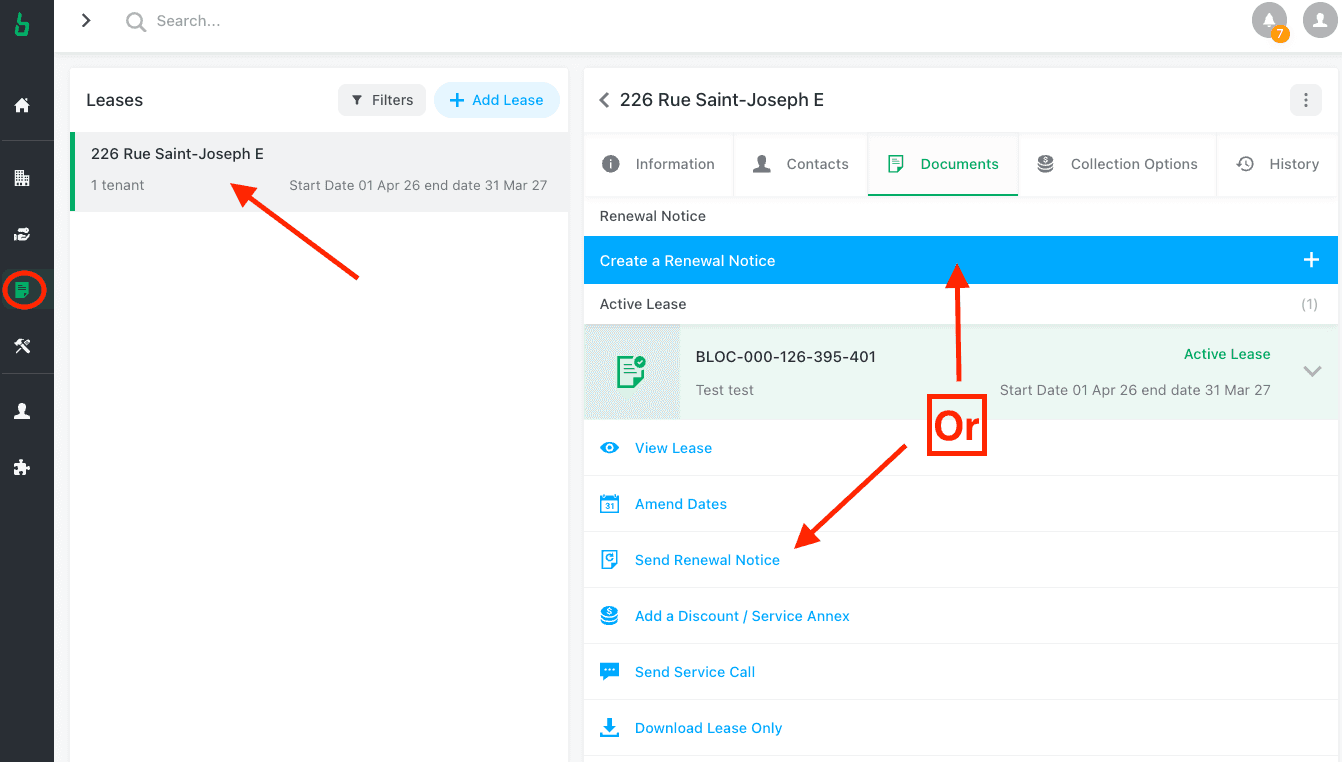
Step 1: Go to the Leases tab
Start by clicking the Leases tab in the left-hand menu of your dashboard. This tab lists all of your active leases and those currently being processed.
Step 2: Select the lease to renew
In the list of leases, select the one you want to renew.
Step 3: Create the renewal notice
Click the blue Create a Renewal Notice or Send Renewal Notice button. Both buttons open the form where you’ll enter the information needed to renew the lease.
Step 4: Fill in the required information
Complete every section of the form carefully:
- Renewal dates: Enter the start and end dates of the renewed lease.
- Rent amount: Enter the rent for the new period. Make sure it matches the exact amount agreed upon with the tenant.
- Explanations and other changes: Add any explanation or changes to the lease terms, such as updates to the building rules or specific arrangements agreed upon with the tenant.
- Scheduled sending: Choose the date and time the renewal notice will be sent to the tenant.
- Deadlines and reminders: Set deadlines and reminders to make sure the tenant replies on time. You can set up automatic reminders so nothing slips through the cracks.
Step 5: Preview and review
Before sending the renewal notice, take a moment to preview it and check all the information. This step is essential to avoid errors or omissions.
Step 6: Send the renewal notice
Once everything is checked, finalize the renewal notice. It will be emailed automatically to the tenant(s), who can reply online by choosing one of the following three options:
- I accept the lease renewal with its modifications.
- I am not renewing my lease and I will vacate the dwelling at the end of the lease term.
- I refuse the proposed modifications and I wish to renew my lease.
Step 7: Tenant’s response
- Changes accepted: If the tenant accepts the new terms, the lease is automatically renewed with the changes.
- Lease not renewed: If the tenant declines to renew, the lease ends on its original end date and the tenant moves out.
- Changes refused but lease renewed: If the tenant refuses the changes but wants to renew the lease, you may need to negotiate to reach an agreement.
Have more questions? Keep browsing our Help Center or contact us!